
How to Program a CNC Camless Spring Machine: A Beginner's Guide
How to Program a CNC Camless Spring Machine: A Beginner's Guide
Programming is one of the biggest advantages of a CNC camless spring machine. Unlike traditional cam-driven machines that require mechanical cam replacement and manual adjustments, camless spring machines use intelligent CNC programming to control every servo axis independently.
By creating and saving production programs, manufacturers can quickly switch between different spring designs, reduce setup time, and improve production efficiency.
This guide explains the basic programming workflow of a CNC camless spring machine.
What Is CNC Camless Spring Machine Programming?
Programming is the process of entering the production parameters that control every movement of the machine.
Instead of adjusting mechanical cams, operators create a digital program that defines how the spring will be manufactured.
Typical programming information includes:
Wire diameter
Wire feed length
Coil diameter
Number of coils
Pitch
Spring leg angles
Tool positions
Production speed
Cutting position
Once completed, the program controls the entire manufacturing process automatically..
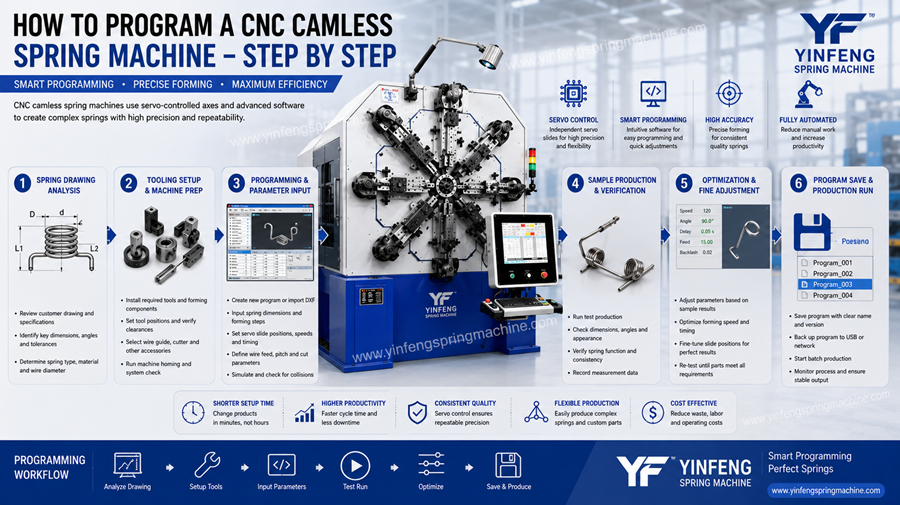
Step 1: Analyze the Spring Drawing
Before programming begins, operators should carefully review the spring drawing or technical specification.
Important information includes:
Spring type
Wire diameter
Outside diameter
Number of coils
Free length
Pitch
End shape
Material specification
A complete understanding of the product helps ensure accurate programming.
Step 2: Select the Appropriate Tooling
Choose the forming tools that match the spring design.
Depending on the product, tooling may include:
Forming tools
Cutting tools
Wire guides
Mandrels
Special forming attachments
Correct tooling setup is essential before entering production parameters.
Step 3: Create a New CNC Program
Using the machine's control system, create a new production program.
The operator enters the required production data according to the spring drawing.
Typical settings include:
Wire feed length
Coil diameter
Pitch value
Number of coils
Servo axis movements
Forming sequence
Cutting position
The CNC controller automatically coordinates all servo movements during production.
Step 4: Set Tool Positions
After programming, adjust each forming tool to the correct position.
Independent servo-controlled slides allow precise positioning for:
Coil forming
Leg forming
Pitch control
End shaping
Digital adjustments make this process faster than traditional mechanical machines.
Step 5: Produce Sample Springs
Before mass production, manufacture several sample springs.
Inspect critical dimensions such as:
Outside diameter
Free length
Coil spacing
Leg angle
Overall shape
Minor parameter adjustments may be required to achieve the desired result.
Step 6: Optimize Production Parameters
After measuring the sample springs, operators can fine-tune:
Feed length
Coil diameter compensation
Pitch
Tool positions
Production speed
Optimization improves product quality while reducing material waste.
Step 7: Save the Program
Once the spring meets specifications, save the program in the machine's memory.
Saved programs provide several benefits:
Faster repeat production
Reduced setup time
Improved consistency
Simplified product management
Repeat orders can be produced simply by recalling the saved program.
Can Programs Be Edited Later?
Yes.
If customer requirements change, operators can modify existing programs by adjusting:
Spring dimensions
Number of coils
Pitch
Tool positions
Production speed
The updated program can then be saved as a new version while retaining the original.
Programming Tips for Better Results
To improve programming efficiency, manufacturers should:
Carefully review product drawings before programming.
Verify tooling before production.
Produce sample springs for inspection.
Save optimized programs immediately.
Maintain clear program naming for easy retrieval.
Keep backup copies of important programs.
These practices help reduce programming errors and improve production efficiency.
Does Yinfeng Provide Programming Support?
Yes.
Yinfeng provides comprehensive technical support to help customers quickly master CNC programming.
Support includes:
Machine operation training
Programming guidance
Sample debugging assistance
Parameter optimization
Operating manuals
Training videos
Online technical support
After-sales service
These services help customers shorten the learning curve and achieve stable production quickly.
Conclusion
Programming a CNC camless spring machine is significantly simpler and more flexible than setting up a traditional cam-driven machine. By entering production parameters, optimizing sample springs, and saving completed programs, manufacturers can efficiently produce a wide variety of spring designs with excellent precision and repeatability.
With user-friendly CNC controls and professional technical support from Yinfeng, manufacturers can accelerate product development, reduce setup time, and maximize production efficiency.